Catch errors before your users do.
Trapify captures unhandled exceptions, groups them into issues, and streams them to your team in real time. Full stack traces, breadcrumb trails, and one-click triage — production monitoring that stays out of your way.
npm install @trapify-tech/browser

import * as Trapify from '@trapify-tech/browser';
Trapify.init({ dsn: 'https://<key>@trapify.tech/<id>' });
Free forever, with unlimited projects and unlimited team members. Pro is $29/month flat for the whole organisation — never per seat. See full pricing.
- Real-time error stream
- Stack traces + breadcrumbs
- Free tier available
- Setup in 2 min
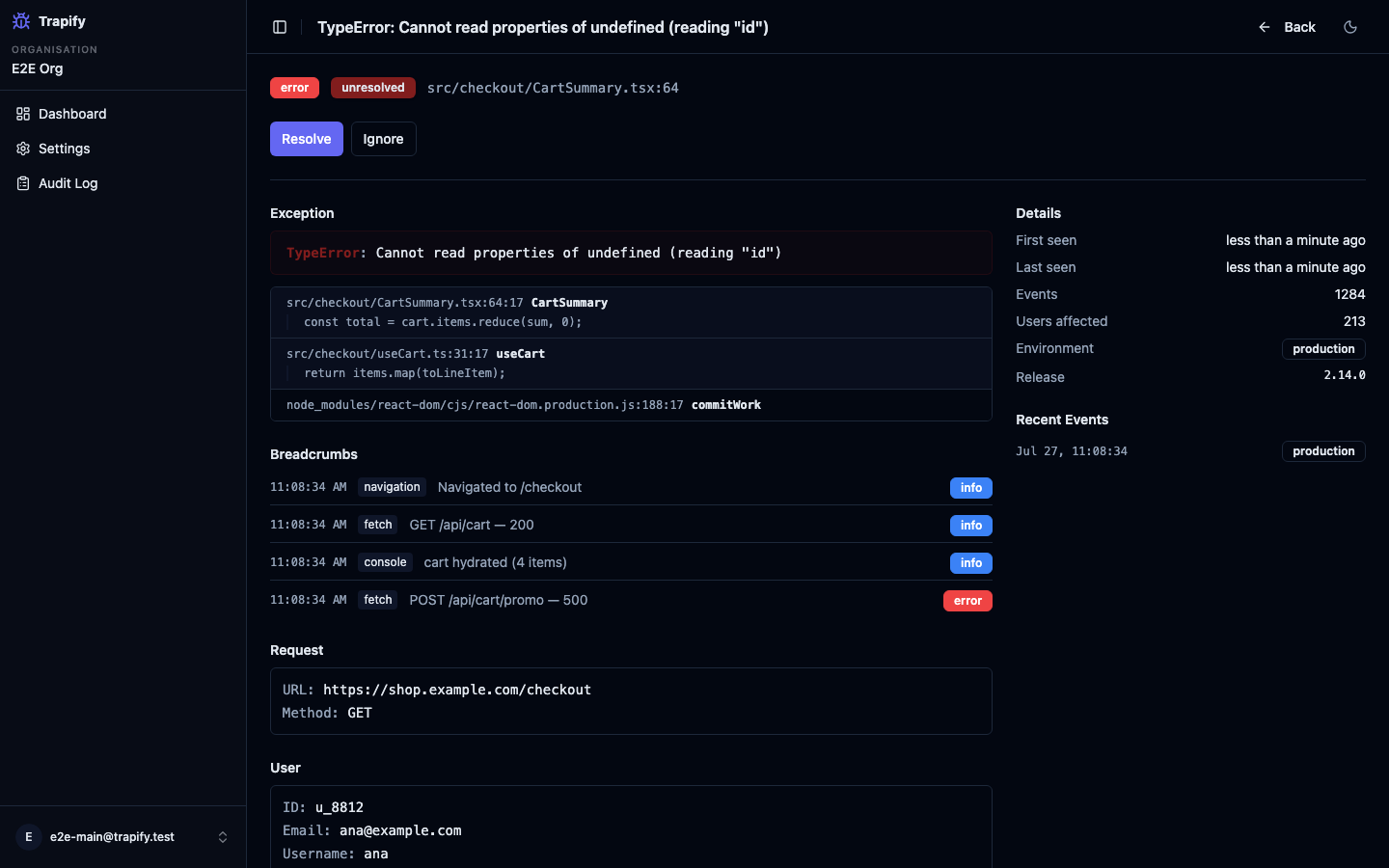
Everything you need to fix bugs faster
Instant DSN Ingest
Drop in our SDK and errors start arriving in seconds. One DSN key per project — no complex setup.
Works With Sentry SDKs
Already instrumented with Sentry? Point SENTRY_DSN at Trapify and keep your existing SDK. One env var, no code changes.
Smart Issue Grouping
Similar errors are fingerprinted and merged automatically. One issue, not ten thousand noise alerts.
Full Stack Traces
Every event captures the full V8 stack trace with in-app frame detection. No more guessing where it broke.
Real-Time Updates
New events stream in live via Firestore listeners. Your issue list is always current — no polling, no refreshing.
Team Triage
Resolve, ignore, or re-open issues as a team. Every status change is audit-logged with who did it and when.
Breadcrumb Trail
Console output, fetch calls, and navigation events captured automatically before every error. Reproduce bugs fast.
beforeSend Hook
Filter or mutate events before they leave the browser. Scrub PII, drop noise, or attach extra context.
Event Analytics
First seen, last seen, event count, affected users — everything you need to prioritise what to fix next.
Up and running in 2 minutes
- 01 Create your organisation and invite your team
- 02 Create a project and copy your DSN key
- 03 Install the SDK: npm install @trapify-tech/browser
- 04 Call Trapify.init({ dsn }) — first error arrives automatically
- 05 Triage issues, resolve bugs, stay on top of production
Simple, transparent pricing
One flat price per organisation. Seats and projects are never counted.
Free
$0 forever
No credit card required
- Unlimited projects
- Unlimited team members
- 5,000 events/month (hard cap — never an overage bill)
- 30-day event retention
- Stack traces + breadcrumbs
- Real-time issue stream
- Team triage (resolve / ignore)
Pro
$29 /month
flat per organisation · $290/year billed annually · 14-day free trial
- Unlimited projects
- Unlimited team members — seats are never counted or billed
- 500,000 events/month (hard cap — never an overage bill)
- 90-day event retention
- User context + release tracking
- Audit log
- Everything in Free
Frequently asked questions
Is Trapify free?
Yes — the free tier gives you unlimited projects, unlimited team members and 30 days of event retention. No credit card required.
What does Pro include?
Pro unlocks a larger monthly event allowance, 90-day event retention, user context and priority support. It is $29/month flat for the whole organisation, or $290/year billed annually. New organisations get a 14-day free trial — no card required.
Do you charge per seat?
No. Every plan includes unlimited team members and unlimited projects, and the price does not move when you add either. Trapify meters one thing — monthly event volume — and that meter is a hard cap rather than a bill. Invite the whole team on the free plan if you like.
Is there an event limit on the Free and Pro plans?
Yes, and it is a hard cap rather than a metered overage: Free includes 5,000 events per month and Pro includes 500,000. Events beyond the cap are dropped and your SDK is told to back off — you will never receive an invoice you did not approve. Current usage is shown in your organisation settings.
How does the SDK work?
Call Trapify.init({ dsn }) once at startup. The SDK hooks into window.onerror and unhandledrejection to capture errors automatically. You can also call captureException() or captureMessage() manually anywhere in your code.
What is a DSN?
A DSN (Data Source Name) is a unique key that identifies your project. The SDK sends events to our ingest endpoint authenticated with your DSN. It is a write-only ingest credential — it can submit events to one project and nothing else, so it is safe to ship in a browser bundle. Rotating a DSN in place is not supported yet.
How does issue grouping work?
Each error is fingerprinted using its exception type, message, and the innermost in-app stack frame. Errors with the same fingerprint are grouped into a single issue — so a TypeError at the same location only appears once, regardless of how many times it fires.
Can I filter out sensitive data?
Yes. Pass a beforeSend callback to init(). Return the modified event to send it, or return null to drop it entirely. Use it to strip PII, filter by environment, or attach custom tags.
Does it work in Node.js?
The core SDK auto-detects Node.js and hooks into process.uncaughtException and unhandledRejection. Fetch and navigation breadcrumbs are browser-only and skipped automatically in Node.
Where is my error data stored, and for how long?
Events are stored in Google Cloud Firestore in the eur3 European multi-region (Belgium and the Netherlands). Ingest compute currently runs in us-central1, so payloads transit the United States before being written to European storage. Retention is 30 days on Free and 90 days on Pro. The security page at trapify.tech/security lists every field stored, who has access, and how to request deletion.
Does Trapify scrub personal data for me?
No — Trapify performs no server-side PII scrubbing, so what your SDK sends is what gets stored. Scrubbing belongs on your side, before the event leaves your process: pass a beforeSend callback to init() and strip or drop anything sensitive. This is deliberate, because we would rather you control what leaves your infrastructure than trust us to guess.
What frameworks are supported?
The SDK is framework-agnostic vanilla TypeScript — it works in React, Vue, Svelte, Next.js, Astro, or plain JS. Framework-specific wrappers are on the roadmap.